Tapshot io
WASD / Arrow Keys: Move your character.
Mouse Movement: Look around and aim.
Left Mouse Button: Shoot enemies.
Right Mouse Button / Q / E: Zoom.
Space: Jump.
R: Reload your weapon.
1: Equip sniper rifle.
2: Equip revolver.
3: Equip knife.
F: Interact with objects.
Esc: Open the game menu.
F11: Toggle fullscreen mode.










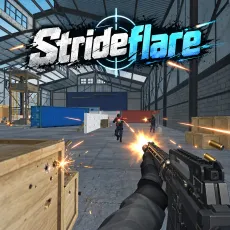

WHAT IS TAPSHOT IO?
Tapshot io is a fast-paced multiplayer first-person shooter where players compete across multiple maps using a sniper rifle, revolver, and knife. Your objective is to eliminate opponents, build killstreaks, and climb the leaderboard through accurate shooting and quick movement. Each battle rewards sharp reflexes and precise timing as you dodge enemy attacks and line up your shots. Beyond combat, you can earn XP and money, level up, open cases, and customize your weapons with skins. Jump into a browser match and put your shooting skills to the test!
HOW TO PLAY
Join a Match: Enter a multiplayer battle and prepare to face other players across different maps.
Choose Your Weapon: Use a sniper rifle, revolver, or knife depending on your combat situation.
Aim and Eliminate Enemies: Land accurate shots while moving quickly to avoid incoming attacks.
Build Your Killstreak: Defeat consecutive opponents and compete for a higher leaderboard position.
Earn and Spend Rewards: Collect XP and money, level up, open cases, and unlock weapon skins.
Master Precision and Movement in FPS Battles
Tapshot io emphasizes accuracy, reaction speed, and movement during multiplayer gunfights. Successful players must balance offensive shooting with defensive positioning to survive encounters and maintain their killstreaks.
The sniper rifle rewards precise aiming, while the revolver and knife provide alternative weapon choices. Switching your approach based on the situation can help you respond to different opponents. Staying mobile while lining up shots is especially important when competing against other players.
Earn XP, Open Cases, and Customize Weapons
Progression extends beyond individual matches. As you participate in battles, you can earn XP and money, increase your level, and explore additional customization options.
The lobby provides access to the shop and other activities between matches. Opening cases and unlocking weapon skins lets you change the appearance of your weapons, giving you more customization choices as you continue playing.
Play Multiplayer Matches on Desktop or Mobile
The game runs directly in a web browser on desktop and mobile devices without requiring downloads. This makes it convenient to enter quick multiplayer sessions whenever you want.
You can also switch to full-screen mode for a more immersive view of the action. Whether you're practicing your aim or competing for leaderboard positions, each match offers another opportunity to improve your shooting performance.
Controls
WASD / Arrow Keys: Move your character.
Mouse Movement: Look around and aim.
Left Mouse Button: Shoot enemies.
Right Mouse Button / Q / E: Zoom.
Space: Jump.
R: Reload your weapon.
1: Equip sniper rifle.
2: Equip revolver.
3: Equip knife.
F: Interact with objects.
Esc: Open the game menu.
F11: Toggle fullscreen mode.